If you have a Dual Boot system with Windows and Linux, it is very likely that at some point you have encountered this message when trying to mount an NTFS partition from Linux:
The NTFS partition is in an unsafe state. Please resume and shutdown Windows fully (no hibernation or fast restarting)
In my case, it appeared suddenly while trying to access a shared partition from Linux, even though it had been working without issues until the day before. The worst part is that the message is not clear at all if you don't know what is happening behind the scenes.
In this article, I explain what this error actually means, why it occurs, and, above all, how to solve it safely without losing data.
Surely, if you have a dual Windows and Linux installation on your machine, at some point the following error will have appeared when trying to open a shared Windows/Linux partition from your Linux distribution:
The NTFS partition is in an unsafe state. Please resume and shutdown Windows fully (no hibernation or fast restarting)Specifically, it gives us an error similar to the following; in my case:
Error mounting /dev/sda5 at /run/media/andres/compartido: Command-line `mount -t "ntfs" -o "uhelper=udisks2,nodev,nosuid,uid=1000,gid=1000" "/dev/sda5" "/run/media/andres/compartido"' exited with non-zero exit status 14: The disk contains an unclean file system (0, 0). Metadata kept in Windows cache, refused to mount. Failed to mount '/dev/sda5': Operación no permitida The NTFS partition is in an unsafe state. Please resume and shutdown Windows fully (no hibernation or fast restarting), or mount the volume read-only with the 'ro' mount option.This error is caused on machines with Dual boot running Windows version 8 or higher and Linux when trying to mount a partition; this error is due to Windows, in its attempt to take complete control of your machine and the world, never knowing (or not wanting to know) about the existence of other Operating Systems like Linux and committing this kind of outrage...
What the error “The NTFS partition is in an unsafe state” means
This error indicates that Windows did not close the NTFS partition correctly and left it marked as “in use.” When Linux detects this state, it refuses to mount it in read/write mode to avoid data corruption.
The message is usually accompanied by errors like this (very similar to the one that appeared to me):
The disk contains an unclean file system.
Metadata kept in Windows cache, refused to mount.
Failed to mount '/dev/sda5': Operation not permitted
Linux is not failing: it is being cautious.
Why this error occurs in Dual Boot systems
The problem appears almost exclusively on computers with Windows 8, 10, or 11 + Linux, and it has two main causes.
Windows Fast Startup
All this hassle is because Windows introduced a new feature starting with Windows 8 to reduce the Operating System's boot time called Fast Startup (you can also find Fast Startup in Windows 10).
When you turn off your machine through the shut down process, Windows saves system information in a cache and also keeps partitions mounted, making it impossible for our Linux distribution to mount the partitions again (since another system -Windows- has them mounted).
Windows Hibernation and the hiberfil.sys file
In other words, when Windows hibernates, it saves the system state in a file called hiberfil.sys and marks the NTFS partitions as active.
From Linux's perspective:
- Windows is “paused”
- The partition is not safe for writing
- Mounting it could break the file system
That's why ntfs-3g (the NTFS driver in Linux) blocks RW mounting.
Since Windows 8, turning off the system DOES NOT turn it off completely. In reality:
- It closes user sessions
- It hibernates the kernel
- It leaves the NTFS partitions in a “half-open” state
In other words: even if you press Shut Down, Windows behaves as if it were hibernating.
This is exactly what happened to me: I swore I was shutting down Windows correctly… but Fast Startup was still active.
The error when mounting NTFS partitions in Linux
In my system, the specific error was this:
Error mounting /dev/sda5 at /run/media/andres/compartido: Metadata kept in Windows cache, refused to mount. The NTFS partition is in an unsafe state.It doesn't matter if you use Ubuntu, Mint, Fedora, or Arch: the message is always the same because the problem comes from Windows, not Linux.
Disabling Fast Startup in Windows
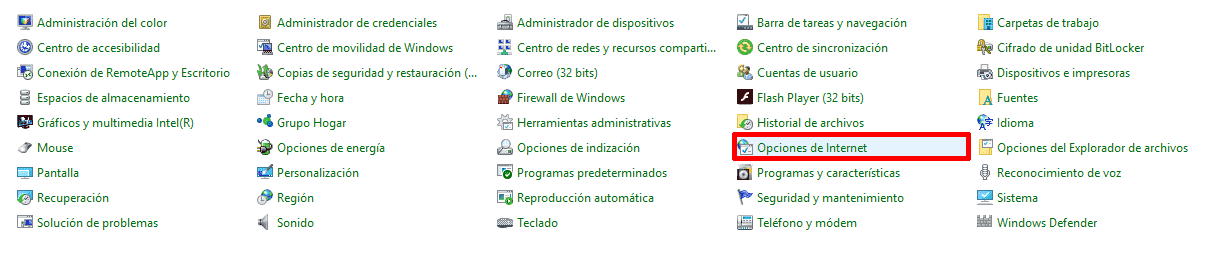
Returning to what interests us, which is solving this error by disabling this feature (Fast Startup); we must go to Windows and open the Control Panel.
We go to Power Options:
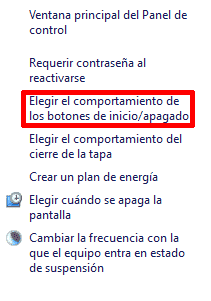
Choose what the power buttons do:
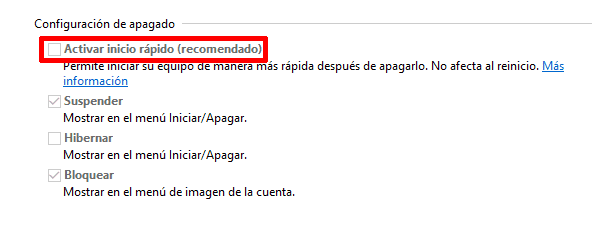
And we uncheck the checkbox: "Turn on fast startup":
In summary:
Control Panel > Power Options > Choose what the power buttons do > uncheck the "Turn on fast startup" checkbox
- Open Control Panel
- Enter Power Options
- Click on Choose what the power buttons do
- Click on Change settings that are currently unavailable
- Uncheck Turn on fast startup (recommended)
- Save changes
Shut down Windows correctly (not restart)
- Boot Windows
- Save everything
- Use Shut Down, not Restart
- Wait for the computer to turn off completely
- ⚠️ Note: if Fast Startup is active, this is not enough.
By turning off our equipment and starting our Linux distribution, you should be able to mount all shared partitions between both systems without any problem.
Check from Linux that the partition is no longer in an unsafe state
Boot Linux and try to mount the partition normally from the file manager.
If everything is correct:
- It will mount in read/write
- The error will disappear
- You will not lose any data
Mounting NTFS in read-only mode: when it makes sense
If you cannot enter Windows (for example, because it won't boot), you can still mount the partition in read-only mode to recover files:
sudo mount -t ntfs-3g -o ro /dev/sda3 /media/windowsThis is safe because:
- It does not modify data
- It does not break hibernation
- It allows copying important files
Why you should NOT force the mount in read/write mode
There are options like:
- ntfsfix
- remove_hiberfile
- forced mount options
Although they work in the short term, they are dangerous because:
- They delete hiberfil.sys
- They break the Windows session
- They can cause file system corruption
In AskUbuntu, there are multiple warnings from users who lost data using these methods.
They should only be used as a last resort, and knowing exactly what you are doing.
ntfsfix and remove_hiberfile: what they do and why they are dangerous
- ntfsfix:
- Does not repair NTFS completely
- Only clears basic flags
- Forces Windows to do a checkup later
- remove_hiberfile:
- Deletes Windows hibernation
- Loses all saved session data
- Can cause failures when restarting
Personally, I do not recommend them except for data recovery before a format.
Common errors and special cases
- “I disabled Fast Startup and it still fails”
- → Make sure to shut down Windows completely after the change.
- “I deleted Windows and it’s still in an unsafe state”
- → The partition remained marked; it may require repair from Windows or read-only access.
- “It only mounts in RO”
- → Windows did not close cleanly or there was a crash.
Conclusion
The error “The NTFS partition is in an unsafe state” is not a Linux bug, but a direct consequence of Windows Fast Startup and hibernation.
The correct solution is clear:
- Disable Fast Startup
- Shut down Windows correctly
- Avoid forcing dangerous mounts
Since I did it this way on my computer, NTFS partitions always mount without problems.
Frequently Asked Questions about NTFS, Windows, and Linux
- Does it work in Windows 11?
- Yes, Windows 11 also uses Fast Startup.
- Can I lose data?
- Only if you force RW mounting or use dangerous options.
- Is Linux incompatible with NTFS?
- No, but it respects Windows safety flags.
- Is it better to use another partition for sharing data?
- Yes, or use ext4 with drivers on Windows.