Content Index
- What are Polymorphic Relationships in Laravel?
- ⚙️ Types of Polymorphic Relationships
- Example 1: Many-to-Many Relationship posts and tags
- Example 2: One-to-Many Relationship
- Example 3: One-to-One Relationship
- Example 4: One-to-Many Relationship books and payments, leftJoin and optional 1-N polymorphic relationships
- Example 5: Inverse Many-to-Many Relationship in Laravel
- Validation with instanceof in Polymorphic Relationships
- Best Practices and Common Mistakes
- ✅ Best Practices:
- ❌ Common Mistakes:
- Conclusion
- ❓ Frequently Asked Questions
- What are morphic relationships in Laravel and why do they exist?
- Difference between normal relationships and polymorphic relationships
- How morphic relationships work in Eloquent
- What columns morphs() actually creates
- Types of morphic relationships in Laravel
- One-to-one morphic relationship (1:1)
- Many-to-many morphic relationship (N:M)
- Example: shopping cart with polymorphic products
- The problem: different types of products with different columns
- Tutorials had columns like:
- Why a Tutorial does not behave the same as a Book
- How to limit columns in a morphic relationship using constrain()
- Defining different selects for each model
- Customizing columns in selection within Morphic Relationships
- Complete example with ShoppingCart, Tutorial, and Book
- Why this solution avoids errors and improves performance
- Common errors when working with morphic relationships in Laravel
- Best practices when using morphic relationships in real projects
- Frequently asked questions about morphic relationships in Laravel
- Conclusion: when morphic relationships really make a difference
When I started working with Laravel and Eloquent, one of the concepts that caught my attention the most was polymorphic relationships. They are extremely useful when we want to reuse the same table or model to associate it with multiple entities without duplicating structures.
In this guide, I explain not only how to handle error pages in Laravel, but also what polymorphic relationships are, how to use them, and I share real-world use cases—including working examples from my own project with books, payments, and files, as well as with publications.
In Laravel, to use many-to-many relationships, we have it very easy. Instead of creating a pivot table for each relationship as shown previously, we can create polymorphic relationships, which in other words, allows the use of the same pivot table for any relationship we want to relate with the tags. Laravel internally knows what each relationship belongs to by means of a tag:
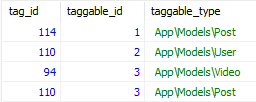
In this way, with this column that is internally managed by Laravel, we can use the same pivot table to map different types such as users, videos, or posts in our Laravel models transparently for us.
What are Polymorphic Relationships in Laravel?
A polymorphic relationship allows a model to be associated with several other models using a single flexible relationship.
For example: an images table can be linked to both users and posts.
Instead of creating a table for each relationship, Laravel uses generic columns like imageable_id and imageable_type to store the ID and the model it belongs to.
// Ejemplo simple
class Image extends Model {
   public function imageable(): MorphTo {
       return $this->morphTo();
   }
}
⚙️ Types of Polymorphic Relationships
Laravel offers various methods depending on the type of relationship you need:
Type Method Classic equivalent
One-to-one morphOne() hasOne()
One-to-many morphMany() hasMany()
Many-to-many morphToMany() / morphedByMany() belongsToMany()
For all types of polymorphic relationships, the morph prefix is used to define them:
- morphOne(MODEL, PIVOTTABLE): Defines a one-to-one polymorphic relationship. For example, a profile relationship can be used for different types like users, people, or companies; its equivalent to classic relationships is the hasOne() type.
- morphMany(MODEL, PIVOTTABLE): Used to define a one-to-many polymorphic relationship. For example, a categories relationship can be related to other models like posts or videos; its equivalent to classic relationships is hasMany().
ManyToMany:
- morphToMany(MODEL, PIVOTTABLE): This method is used to define a many-to-many polymorphic relationship. For example, the tags table which can be related to different types of models like posts or videos.
- morphedByMany(MODEL, PIVOTTABLE): This method is used in a model to establish a many-to-many relationship with other models using a polymorphic relationship. This relationship is placed on the "taggable" model.
With this structure, the same model can be shared by multiple entities without duplicating code.
Another example of a relationship that can be polymorphic is documents/comments, which can belong to a person, post, user, among others. This type of relationship would be a one-to-many polymorphic type.
Previously, we used a polymorphic relationship between users and authentication tokens via Sanctum.
Polymorphic relationships allow a record in one table to be related to multiple different models.
Polymorphic relationships in Laravel Eloquent are a powerful tool for handling situations where a record can be related to different entities. Instead of creating separate tables for each type of relationship, polymorphic relationships allow us to establish flexible connections between models. Here is an introduction with examples:
Unlike traditional relationships (like 1 to n or n to n), where the relationship is always fixed, in polymorphic relationships, the relationship can vary depending on the record.
Although we started by introducing the use of polymorphism for many-to-many relationships, we can also use them in the rest of the relationships, but it is in the use of many-to-many relationships where it is most important (and also one-to-many).
It is important to note that for the main relationship, the tags, the morphToMany() method is used to define the relationship, and for the "taggable" model, morphedByMany() is used. That is, the latter would be the one that has the polymorphic relationship.
The definition of these methods can be a bit abstract, so let's look at some examples.
Example 1: Many-to-Many Relationship posts and tags
In this exercise, we are going to create the relationships between tags and posts, where a post can have 0 to N tags and a tag can be assigned to 0 or N posts.
We start by creating the migrations:
$ php artisan make:migration create_tags_table
<?php
use Illuminate\Database\Migrations\Migration;
use Illuminate\Database\Schema\Blueprint;
use Illuminate\Support\Facades\Schema;
class CreateTagsTable extends Migration
{
    public function up()
    {
        Schema::create('tags', function (Blueprint $table) {
            $table->id();
            $table->string('title');
            $table->timestamps();
        });
    }
    public function down()
    {
        Schema::dropIfExists('tags');
    }
}
Another migration for the pivot table:
$ php artisan make:migration create_taggables_table
<?php
use Illuminate\Database\Migrations\Migration;
use Illuminate\Database\Schema\Blueprint;
use Illuminate\Support\Facades\Schema;
class CreateTaggablesTable extends Migration
{
    public function up()
    {
        Schema::create('taggables', function (Blueprint $table) {
            $table->id();
            $table->unsignedBigInteger('tag_id');             $table->unsignedBigInteger('taggable_id');
            $table->string('taggable_type'); // 'App\Models\Post'
            $table->timestamps();

            $table->unique(['tag_id', 'taggable_id', 'taggable_type']);
            $table->foreign('tag_id')->references('id')->on('tags')->onDelete('cascade');
        });
    }
    public function down()
    {
        Schema::dropIfExists('taggables');
    }
}
Which usually has the suffix of able as in the previous case.
And in the models:
namespace App\Models;
use Illuminate\Database\Eloquent\Model;
class Tag extends Model
{
    public function posts()
    {
        return $this->morphedByMany(Post::class, 'taggable');
    }
}
namespace App\Models;
use Illuminate\Database\Eloquent\Model;
class Post extends Model
{
    public function tags()
    {
        return $this->morphToMany(Tag::class, 'taggable');
    }
}
In the posts controller, we can make some modifications for assigning tags to posts:
class PostController extends Controller
{
    public function create()
    {
        $tags = Tag::pluck('id', 'title');
        $categories = Category::pluck('id', 'title');
        $post = new Post();
        return view('dashboard.post.create', compact('post', 'categories', 'tags'));
    }
    public function store(StorePostPost $request)
    {
        $post = Post::create($requestData);
        $post->tags()->sync($request->tags_id);
        *
    }

    public function edit(Post $post)
    {
        $tags = Tag::pluck('id', 'title');
        *
        return view('dashboard.post.edit', compact('post', 'categories', 'tags'));
    }
    public function update(UpdatePostPut $request, Post $post)
    {
        //$post->tags()->attach(1);
        $post->tags()->sync($request->tags_id);
        *
    }
}
As for the view, it looks like this:
<div class="mt-3">
    <label for="tag_id">Tags</label>
    <select multiple class="form-control" name="tags_id[]" id="tags_id">
        @foreach ($tags as $title => $id)
    <option {{ in_array($id, old('tags_id') ?: $post->tags->pluck("id")->toArray()) ? "selected": "" }} value="{{ $id }}">{{ $title }}</option>
        @endforeach
    </select>
</div>
With the code above, we create a multiple selection list of all tags; the tags that are assigned to the post are selected by default.
We also create the CRUD process for tags:
<?php
namespace App\Http\Controllers\Dashboard;
use App\Models\Tag;
use App\Http\Controllers\Controller;
use App\Http\Requests\Tag\PutRequest;
use App\Http\Requests\Tag\StoreRequest;
class TagController extends Controller
{
    public function index()
    {
        if (!auth()->user()->hasPermissionTo('editor.tag.index')) {
            return abort(403);
        }
        $tags = Tag::paginate(2);
        return view('dashboard/tag/index', compact('tags'));
    }
    public function create()
    {
        if (!auth()->user()->hasPermissionTo('editor.tag.create')) {
            return abort(403);
        }
        $tag = new Tag();
        return view('dashboard.tag.create', compact('tag'));
    }
    public function store(StoreRequest $request)
    {
        if (!auth()->user()->hasPermissionTo('editor.tag.create')) {
            return abort(403);
        }
        Tag::create($request->validated());
        return to_route('tag.index')->with('status', 'Tag created');
    }
    public function show(Tag $tag)
    {
        if (!auth()->user()->hasPermissionTo('editor.tag.index')) {
            return abort(403);
        }
        return view('dashboard/tag/show', ['tag' => $tag]);
    }
    public function edit(Tag $tag)
    {
        if (!auth()->user()->hasPermissionTo('editor.tag.update')) {
            return abort(403);
        }
        return view('dashboard.tag.edit', compact('tag'));
    }
    public function update(PutRequest $request, Tag $tag)
    {
        if (!auth()->user()->hasPermissionTo('editor.tag.update')) {
            return abort(403);
        }
        $tag->update($request->validated());
        return to_route('tag.index')->with('status', 'Tag updated');
    }
    public function destroy(Tag $tag)
    {
        if (!auth()->user()->hasPermissionTo('editor.tag.destroy')) {
            return abort(403);
        }
        $tag->delete();
        return to_route('tag.index')->with('status', 'Tag delete');
    }
}
In the code above, only the controller is shown. You must implement the rest of the code such as the Requests classes, views, routes, and associated permissions. If you have any questions, you can check the source code at the end of the section.
Now, we will look at some other examples that were taken from the official documentation and that you can use as a reference to know how to use the rest of the available relationship types. If you could understand the many-to-many polymorphic relationship we presented before, these will be much easier to understand.
Example 2: One-to-Many Relationship
In this example, our main model is comments. As "able/selectable" type models, we have videos and posts; that is, comments can be used by the posts and videos entities:
posts
    id - integer
    title - string
    body - text

videos
    id - integer
    title - string
    url - string

comments
    id - integer
    body - text
    commentable_id - integer
    commentable_type - string
As for the models, they look like this:
<?php

namespace App\Models;

use Illuminate\Database\Eloquent\Model;
use Illuminate\Database\Eloquent\Relations\MorphTo;

class Comment extends Model
{
    /
     * Get the parent commentable model (post or video).
     */
    public function commentable(): MorphTo
    {
        return $this->morphTo();
    }
}

use Illuminate\Database\Eloquent\Model;
use Illuminate\Database\Eloquent\Relations\MorphMany;

class Post extends Model
{
    /
     * Get all of the post's comments.
     */
    public function comments(): MorphMany
    {
        return $this->morphMany(Comment::class, 'commentable');
    }
}

use Illuminate\Database\Eloquent\Model;
use Illuminate\Database\Eloquent\Relations\MorphMany;

class Video extends Model
{
    /
     * Get all of the video's comments.
     */
    public function comments(): MorphMany
    {
        return $this->morphMany(Comment::class, 'commentable');
    }
}
Example 3: One-to-One Relationship
In this example, our main model is images. As "able/selectable" type models, we have users and posts; that is, these entities have an associated image.
posts
    id - integer
    name - string

users
    id - integer
    name - string

images
    id - integer
    url - string
    imageable_id - integer
    imageable_type - string
The migration:
Schema::create('images', function (Blueprint $table) {
   $table->id();
   $table->string('url');
   $table->morphs('imageable'); // Crea imageable_id y imageable_type
   $table->timestamps();
});
As for the models, they look like this:
<?php

namespace App\Models;

use Illuminate\Database\Eloquent\Model;
use Illuminate\Database\Eloquent\Relations\MorphTo;

class Image extends Model
{
    /
     * Get the parent imageable model (user or post).
     */
    public function imageable(): MorphTo
    {
        return $this->morphTo();
    }
}

use Illuminate\Database\Eloquent\Model;
use Illuminate\Database\Eloquent\Relations\MorphOne;

class Post extends Model
{
    /
     * Get the post's image.
     */
    public function image(): MorphOne
    {
        return $this->morphOne(Image::class, 'imageable');
    }
}

use Illuminate\Database\Eloquent\Model;
use Illuminate\Database\Eloquent\Relations\MorphOne;

class User extends Model
{
    /
     * Get the user's image.
     */
    public function image(): MorphOne
    {
        return $this->morphOne(Image::class, 'imageable');
    }
}
Example 4: One-to-Many Relationship books and payments, leftJoin and optional 1-N polymorphic relationships
In my personal project —an API for selling books that also handles courses and files— I took advantage of polymorphic relationships to unify the payment system (FilePayment).
Each purchase belongs to a different resource (book, course, etc.), but the payment structure is the same.
Instead of duplicating tables, I used a one-to-many polymorphic relationship:
class FilePayment extends Model {
   public function filePaymentable(): MorphTo {
       return $this->morphTo();
   }
}
class Book extends Model {
   public function filePayments() {
       return $this->morphMany(FilePayment::class, 'filePaymentable');
   }
}
Example 5: Inverse Many-to-Many Relationship in Laravel
It is often necessary to get the records of a principal entity given the secondary one in a many-to-many relationship; the typical scenario is that we have a many-to-many relationship between posts and tags, and we want to get the posts that belong to certain tags; for this, we can make a query like the following:
 Post::whereHas('tags', function($q) {
       $q->where('tag_id', 1);
    })->whereHas('tags', function($q) {
       $q->where('tag_id', 4);
    })->get();
Or if the tags are dynamic:
$tag_ids=[25,40,30];
    Post::where(function($query)use($tag_ids){
        foreach ($id as $value){
            $query->whereHas('tags',function ($query)use($value){
                $query->where('tag_id',$value);
            });
        }
    })->get();
The Post model looks like this:
class Post extends Model
{
    public function tags()
    {
        return $this->belongsToMany(Tag::class, 'post_tags', 'post_id', 'tag_id');
    }
}
Validation with instanceof in Polymorphic Relationships
Another useful situation: validating the actual type of the associated model before operating on it. I want to show you a possible use of instanceof in Laravel's polymorphic relationships.
For example, when downloading a file, I want to make sure it truly belongs to a book:
if ($file->fileable instanceof Book) {
   // Ejecutar lógica de descarga segura
}
The model is this:
class Book extends Model
{
  // ...
  public function files()
  {
      return $this->morphMany(File::class, 'fileable');
  }
}
These validations prevent errors or possible vulnerabilities if a user tries to access a resource that doesn't belong to them.
A book can have zero to many files, as observed.
Therefore, it is a one-to-many relationship between books and files.
And those files can belong to different types of models: books, images, videos, etc.
In the future, files could be associated with videos, images, or other models, so we want to avoid any possible problem —either due to a logic error or improper manipulation by the user—.
class File extends Model
{
  // ...
  protected $fillable = ['file', 'type', 'fileable_type', 'fileable_id'];
  public function fileable(): MorphTo
  {
      return $this->morphTo();
  }
}
In summary, the use of instanceof within polymorphic relationships allows us to ensure that the object we are processing corresponds to the expected model type.
In this way, when processing a file related to a book, we can be certain that it truly belongs to a Book, preventing errors in subsequent processes or vulnerabilities within the application.
Best Practices and Common Mistakes
✅ Best Practices:
- Use consistent names (*_able) in polymorphic columns.
- Place relationship filters inside the join closure.
- Validate types with instanceof when working with dynamic resources.
- Clearly document which models can use the relationship.
❌ Common Mistakes:
- Using join instead of leftJoin when you need all records.
- Duplicating pivot tables instead of reusing them polymorphically.
- Not correctly defining the types in migrations (morphs() solves this).
Conclusion
Polymorphic relationships in Laravel are a powerful tool that saves you time and code when handling reusable models.
Mastering this pattern allows you to create clean, scalable, and easy-to-maintain architectures.
In summary, in the last two examples, we see that we have to use the morphTo() method for the main relationship, and for the "able/selectable" types, the morphMany() and morphOne() methods are used respectively.
Finally, the morph() type methods for specifying relationships receive several parameters that can be useful if Laravel fails to correctly interpret the table and relationship name, for example:
return $this->morphToMany(Tag::class, 'taggable', 'taggables', 'taggable_id');As an additional consideration, as we mentioned earlier, many-to-many and one-to-many polymorphic relationships are the most interesting in this type of relationship because, when wanting to make a many-to-many relationship "taggable/able" without being polymorphic, we would have to duplicate the pivot table for that purpose (and in the one-to-many, we couldn't create it to simulate a polymorphic type of the same kind). However, with the use of polymorphic relationships, we can use the same table; conversely, the use of polymorphic relationships for the one-to-one type can be easily managed through a traditional relationship of the same type, meaning one that is not polymorphic. For example, let's remember that for one-to-one relationships we have:
posts
    id - integer
    name - string

users
    id - integer
    name - string

images
    id - integer
    url - string
    imageable_id - integer
    imageable_type - string
We could have a similar relationship to the previous one where posts and users can have an image through:
posts
    id - integer
    name - string
    image_id - integer

users
    id - integer
    name - string
    image_id - integer

images
    id - integer
    url - string
More information about relationships at:
https://laravel.com/docs/master/eloquent-relationships
❓ Frequently Asked Questions
When is it convenient to use polymorphic relationships?
When a model (like Image or FilePayment) can be related to multiple entities without repeating structure.
What is the difference between morphToMany and morphedByMany?
morphToMany is used in the model that has the relationship, while morphedByMany is used in the model that "receives" that relationship.
Can I use morphs() in migrations for all cases?
Yes, morphs('name') automatically creates the name_id and name_type columns.
What are morphic relationships in Laravel and why do they exist?
If you've ever thought while working with Laravel, “this should be solvable with a single relationship,” you were probably about to discover morphic relationships. In Eloquent, these types of relationships allow a model to be associated with different models without duplicating tables or logic, something especially useful when the business domain starts to grow.
In this guide, I'm going to explain what morphic relationships are in Laravel, how they work, the types that exist, and above all, how to solve real problems that appear when models do not share exactly the same columns.
Morphic relationships (or polymorphic relationships) allow a model to belong to more than one type of model using a single relationship.
Instead of having multiple tables or multiple foreign keys, Laravel saves two key columns:
- *_id → the ID of the related model
- *_type → the class name of the related model
This makes it possible for, for example, a comments table to belong to both Post and Video without duplicating structure.
The great advantage is flexibility: you can extend your system without modifying the base schema every time a new related model appears.
Difference between normal relationships and polymorphic relationships
In a traditional relationship, the link is fixed:
a comment belongs to a post, an invoice belongs to a customer, etc.
In a morphic relationship, that link changes dynamically per record.
A comment can belong to a post or a video.
An image can belong to a user or a product.
This reduces maintenance, avoids repeated tables, and keeps the data model clean.
How morphic relationships work in Eloquent
Laravel abstracts all the complexity through very clear methods.
morphTo, morphOne, and morphMany explained simply
- morphTo() → used in the “child” model
- morphOne() → one-to-one relationship
- morphMany() → one-to-many relationship
For example, the model that "receives" the relationship always uses morphTo().
What columns morphs() actually creates
When you use:
$table->morphs('commentable');Laravel automatically creates:
- commentable_id
- commentable_type
And it is Eloquent, not the database, that interprets which model each record belongs to.
What Laravel saves in *_id and *_type
- *_id: the actual ID of the related model
- *_type: the full class name (App\Models\Post, for example)
This is important to understand because later we will see why Laravel might try to read columns that do not exist if we do not control the relationship well.
Types of morphic relationships in Laravel
One-to-one morphic relationship (1:1)
A model has a single related record, but that record can belong to different models.
Typical example: profile images for users and posts.
One-to-many morphic relationship (1:N)
A model can have many related records, such as comments on posts or videos.
It is the most common case and where polymorphism is most utilized.
Many-to-many morphic relationship (N:M)
Here come scenarios like tags that can be associated with multiple different models using a polymorphic pivot table.
Example: shopping cart with polymorphic products
This is where things get interesting.
The cart could contain different types of products:
- Tutorials
- Books
Up to that point, everything is perfect for a morphic relationship.
The problem appeared when tutorials had additional options (like source code per lesson or exclusive lessons) that affected the price, while books had no extra modality.
The problem: different types of products with different columns
Tutorials had columns like:
- exclusive_extra
- price_code_extra
But the Book model does not have those columns, nor should it.
If I left the relationship defined generically, Laravel would try to read non-existent columns and the relationship would fail.
Why a Tutorial does not behave the same as a Book
Although both are “products” from the cart's point of view, they do not share exactly the same structure.
And this is where many theoretical examples fall short:
In real projects, polymorphic models are not always identical.
What happens if Laravel tries to read columns that do not exist
If you do an implicit select * in a morphic relationship, Eloquent does not know which columns exist or not in each model.
Result:
SQL errors or unnecessary queries that affect performance.
How to limit columns in a morphic relationship using constrain()
The solution was to explicitly define which columns Laravel should select according to the model.
And for that, constrain() exists.
Defining different selects for each model
In the cart model, the relationship looked like this:
class ShoppingCart extends Model { public function itemable() { return $this->morphTo()->constrain([ Tutorial::class => function ($query) { $query->select( 'id', 'title', 'url_clean', 'price', 'price_offers', 'exclusive_extra', 'price_code_extra' ); }, Book::class => function ($query) { $query->select( 'id', 'title', 'url_clean', 'price', 'price_offers' ); }, ]); } }Customizing columns in selection within Morphic Relationships
With a morphic relationship, I'm going to show you how you can get different columns. It's that simple. Although it sounds more complex than it is, it's exactly what you can see here.
I am building a shopping cart. Understand that, for my online store, products can be tutorials or books. What is the dilemma?
For example, for courses, I have some that include the option to decide if you want:
- Source code per lesson.
- Exclusive lessons.
This corresponds to the panel we have here, and since it influences the price, I definitely need to pass that information to the shopping cart.
This pair of columns is not defined in the book model.
In the case of the book:
It is only purchased in full, without additional modalities.
Otherwise, the other columns are exactly the same as those I have referenced below.
The syntax is simple:
class ShoppingCart extends Model
{
    ***
    public function itemable()
    {
        return $this->morphTo()->constrain([
            Tutorial::class => function ($query) {
                $query->select('id', 'title', 'url_clean', 'price', 'price_offers', 'exclusive_extra', 'price_code_extra');
            },
            Book::class => function ($query) {
                $query->select('id', 'title', 'url_clean', 'price', 'price_offers'); // , NULL as price_exclusive_extra
            },
        ]);
}- In the method that indicates it is a morphic relationship, we create a constraint.
- We indicate each of the relationships we have.
- We define the columns that should exist in each case.
In the book, the definition is simpler, since it does not need additional columns.
In the course, those extra columns do need to be defined.
This prevents the relationship from failing by searching for non-existent columns, as would happen if it were left generically defined.
Complete example with ShoppingCart, Tutorial, and Book
Each model returns only the columns that actually exist, without forcing artificial structures.
In the case of the book, the relationship is simpler because it does not need additional data.
In the case of the tutorial, extra columns that directly influence the final price are included.
Why this solution avoids errors and improves performance
- Laravel does not look for non-existent columns
- Queries are lighter
- The code better reflects the real business domain
Since I implemented this, the cart stopped being fragile and became completely predictable.
Common errors when working with morphic relationships in Laravel
- Non-existent columns in polymorphic models
- Assuming all models share the same structure.
- Overloading queries unnecessarily
- Not limiting columns when you know exactly what you need.
- Confusing primary keys with polymorphic keys
- Morphic relationships do not use traditional foreign keys at the database level.
Best practices when using morphic relationships in real projects
When to use polymorphism
- Reusable entities
- Models extensible over time
- Domains where the type can vary
When NOT to use morphic relationships
- When relationships are fixed
- When you need strict referential integrity at the SQL level
Frequently asked questions about morphic relationships in Laravel
- Can I use different selects in morphTo?
- Yes, using constrain(), as in the cart example.
- Do morphic relationships affect performance?
- Not necessarily. If misused, yes. Well-controlled, they are very efficient.
- Can they be validated at the database level?
- Not directly. Validation is primarily handled from Eloquent.
Conclusion: when morphic relationships really make a difference
Morphic relationships in Laravel are not just a curiosity of the framework.
Properly used, they allow for flexible, maintainable, and scalable systems, even when models are not identical to each other.
In real scenarios (like a cart with different products) understanding how to control columns, queries, and behavior makes the difference between a fragile system and a solid one.
The next step is to learn how to handle the N+1 problem in Laravel, which is very prone to many-to-one/many relationships.